Reader Maxim asked me to write some notes about the usability of the user interface in Eclipse.
Dear Maxim!
I haven’t yet managed to take advantage of all the benefits of the integrated development environment “Eclipse,” version 3.7.1, item M20110909-1335, because for two hours straight now I haven’t been able to install the Google AppEngine Toolkit into it. Nevertheless, already while installing extensions I started noticing interesting features of the user interface.
The figure below shows the progress window for installing an extension in the Eclipse 3.7 IDE. We see a progress bar, we see a description of the current operation. The following commands are available to us: perform the installation in the background, cancel the installation, show detailed information.
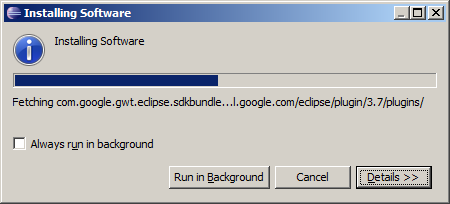
A classic of the genre: any installation process immediately jumps to 50% at launch, hangs in that state for an infinitely long time, and then instantly jumps to 100%. Thus, in this case the progress bar completely loses all the meaning that was built into it.
Hoping to find an indicator showing the time remaining until completion, the user may click the “Details” button. But disappointment will be waiting for him there.
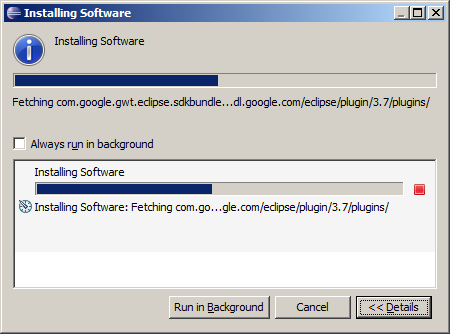
Here we see the very same progress indicator and a description of the command being executed. One can also note the phrase “Installing Software,” which is mentioned as many as four times in such a small window. The “Details” button also does not perform the function implied by its name. There is no new information for the user here. It is hard to imagine a programmer so detached from the object of his labor that he could program such nonsense. But as shown above, on the Eclipse development team there is at least one.
In my view, the reason for this sort of degeneration is as follows: there is still too little quality software in our world. Since early childhood we have been using bad software. And many erroneous patterns have already been embedded deep in our consciousness. In the example, such an erroneous pattern is the presence of the “Details” button. But if there is nothing more to show, maybe this button isn’t needed? Even if there is nothing more to show, the programmer still makes this button, without realizing it, because he has been used to this button since childhood. Or think, for example, about what the symbols << and >> on this button mean. We will never know, because the person who first began using them has long since left us.
A few more examples can be given. Any program, even the simplest one, must have options (Options, Settings). But must it have them? Any program must have a menu with the mandatory sections File, Edit, Window, Help. But is that menu needed? Every program must have a toolbar. But must it have one? And so on.
To clarify add detail. Edward Tufte