A year ago we discussed the table design of the email client Microsoft Outlook. Today let’s talk about tables in Thunderbird.
When using the Mozilla Thunderbird email client, I often run into this scenario. I open the Sent folder and visually scan the list of sent emails, starting with the most recent and then moving downward (into the past). For example, I remember that I sent an email a few days ago, but I don’t remember exactly which day. I need to see what days there were at all, so I can remember.
The figure on the left shows how it is now. Quickly searching for dates is hard. The constantly repeated fragment “10.2011” is confusing. Because of it, it seems as if all the dates are the same. To find the next day, you have to read each line in sequence. For example, try counting how many different days are shown in the table on the left.
This representation is clearly redundant. The figure on the right offers an improved version. Here the date is shown only once for each day. Now searching by day is much faster. To move to the next day, all you have to do is shift your gaze to the next date. Try counting the number of different days again. Feel the difference?
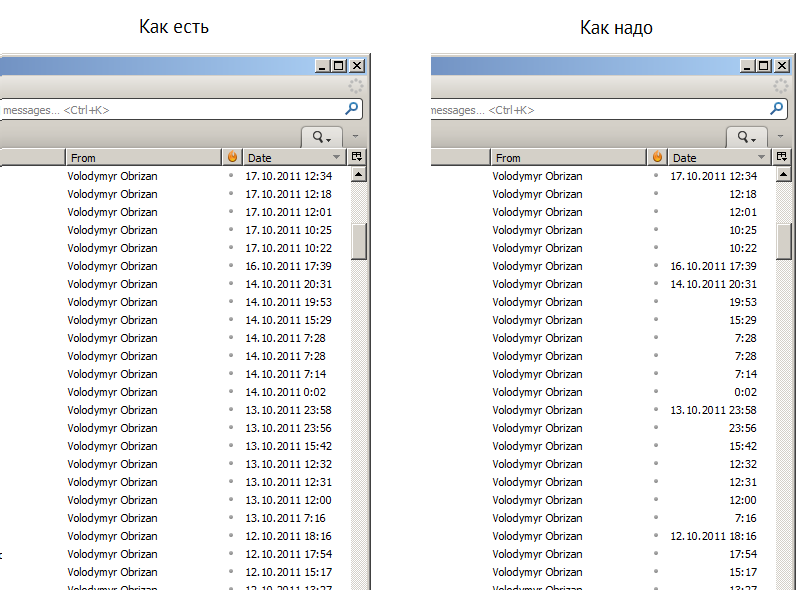
And the fact that the hours and minutes aren’t aligned by place value is just kindergarten, explained by programmers’ laziness. Usually a DateTime-type structure is serialized into the dd.MM.yyyy HH:mm format as a single string, and nobody wants to bother anymore with the fact that the hour can have either two digits or one. Nevertheless, that is no excuse.
The software development process should be set up so that in the end the user can work with the program comfortably, not so that the programmer has to write less code.