Students have to type texts on a keyboard very often. That includes preparing reports, term papers, lab assignments, typing program source code, as well as using email and communicating in blogs, forums, and chats. From personal interaction with this contingent, I know that typing any even slightly complex text is torture for them. In the information age in which you and I have had the good fortune to live, the ability to type text on a keyboard very quickly is a very important skill. A method of nine-finger touch typing has been developed that will substantially reduce the time it takes to enter information into a computer.
Now let’s get down to business. In order to succeed at nine-finger touch typing, you need to follow one single rule: always, when working at a computer, keep your hands in the correct position on the keyboard. Here is what it consists of. Take the starting position: the fingers of your left hand should occupy the ASDF keys, the fingers of your right hand should occupy the JKL; keys (in the Russian layout, ФЫВА and ОЛДЖ, respectively). To find this position without looking at the keyboard or without light, the keys located under the index fingers, F and J, have special raised marks (little dots or bars). When typing text, you need to make sure to press the keys only with the designated finger, as shown in the figure below. Here all the green keys are pressed with the index fingers, the yellow keys are pressed with the middle fingers, the orange keys are pressed with the ring fingers, the pink keys are pressed with the little fingers, and “Space” is pressed with the thumb of either hand.
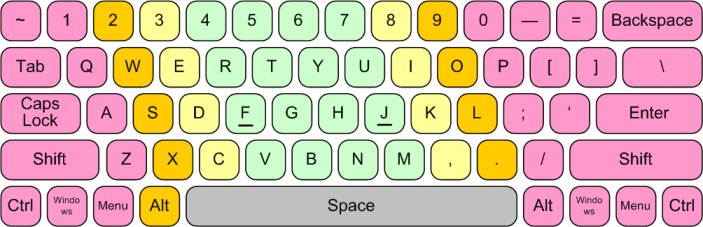
Everything is very simple. There are no other rules or restrictions. You can even keep looking at the keyboard. All that is required of you is discipline and patience. Initially, your typing speed will drop several times over. You will have to lift your hands to look for the needed keys. Over time, you will stop doing this, because you will remember where each key is, and — most importantly — your fingers themselves will remember which key to press when. At this point an important thing will happen: you will realize that there is no longer any need to look down, and you will be able to shift your gaze to the monitor. This plays a very important role, because in addition to the quantitative changes, which consist in the speed of typing characters, you will also have qualitative ones: now you will have the ability to look at what you are writing and correct errors in the text immediately as they occur.
I repeat: all that is required of you is discipline and patience. You will pay for acquiring this skill with two or three months of inconvenience, but it will stay with you for the rest of your life.