Bless, O Lord, my computer for the successful installation of the first service pack for Visual Studio; deliver the installer from the evil one and grant rest to the souls of the temporary files. Amen!
The service pack installer is competently made. As the components are downloaded, they start getting installed. Thus saving the user time. You can’t do that with an offline installer — after all, you first have to download everything and then install it.
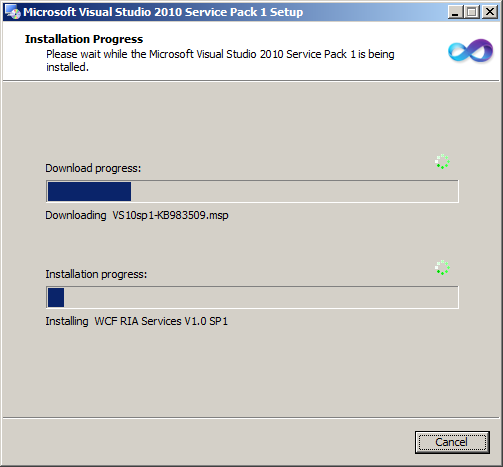
A small thing, but nice.
By the way, Microsoft has long had a technology called Click-Once. It’s a web installer that lets you update an application component by component. Well, say you have a 100-meg app, and you’ve replaced only a couple of files. Downloading the whole installer for two files is a real pain. But Click-Once checks for new files on the server every time the application starts and offers to download and replace them. It saves a lot of time not only for the user, but also for the developer: Click-Once is enabled with a single checkbox in the solution settings. Nothing else needs to be done.
But as it turned out, the miracles don’t end there. If you dig deeper into this technology, you can control the order and timing of component installation from the program itself. I’ll explain with an example. You’re developing an analog of Visual Studio. Your studio is also stuffed to the gills with features and gizmos. The installer has swollen to several hundred megs. But as we know, 20% of the features are used 80% of the time. With Click-Once, you can install the code editor and compiler first, and download and install the remaining 80% of the features in the background. That is, the program isn’t fully installed yet, not all the features are enabled yet, but the user can already start working. Mega-cool.
Have you come across programs like that? Do you use web installers in your own development? Or are you still publishing all your files in those moronic self-extractors?
P.S. Developers in the clouds, please don’t bother. 